Showing posts with label Linux. Show all posts

Wednesday, 13 July 2016

Know More In Gaming Laptop Processor Intel Core 7

Hi brother see you the same again this time, I want to share info about gaming laptop, gaming laptop i7 Processor especially. If seen again ya brother, according to this gaming laptop I already so one needs a lot of people, from students to corporate people. and the game play is indeed very right to remove tiredness of everyday aktivias. And at this time there have been many laptops that brand also appears while continuing to develop in terms of Hardware. the ability of the gaming laptop is also quite good, because it could also create working on a wide range of applications in the field of multimedia, editing the same design.

In the matter of the price of Core i7 gaming laptop is indeed higher than the same laptop. But if you guys notice in terms of the components of the same performance would be appropriate. So yes it is indeed not one reply you guys also have a budget gaming laptop to buy more who've had a Core i7 processor. Anyways this laptop as well in addition to create the main game can be used create the others as well such as video editing, programing, design to rendering can also.
Well make you want to know what sort of form come listening.

1. Asus ROG G752VL-DH71


Know More In Gaming Laptop Processor Intel Core 7


Laptop asus on this one wears a screen sized 17.3 inches IPS DISPLAY Full HD (1920 x 1080), with Processor Intel Core i7-6700HQ (Skylake, GPU Nvidia GeForce GTX 965M and 16 GB DDR4 RAM.
With internal memory, asus 1 TB can store anything you guys need from photos, videos of the most important documents you guys until the data is unclear will also load saved simultaneously. the operating system also already using Windows 10.

2. MSI GE72 APACHE PRO-242


Know More In Gaming Laptop Processor Intel Core 7

in this series the MSI product with Intel Core i7-5700HQ with 16 GB of RAM and Nvidia GeForce GTX 970M also can make you guys enjoy gaming enthusiast who plays on this laptop. The internal memory also provides MSI SSD (chip storage media) for 1 TB.
The screens are also used fairly passable i.e. 17.3 (1920 x 1080) with Windows operating system 10, which could make you guys got its own sensation wearing this laptop. does it weigh is also not too heavy, i.e. 2.7 KG.

3. Alienware 13 ANW13-8636SLV


Know More In Gaming Laptop Processor Intel Core 7

Alienware Unveils laptop that is small enough, this is best in terms of screen that only 13.3 inches with a weight 1.9 kg. but don't underestimated it first, if seen from the laptop processors it also doesn't lose the same other competitors, because it sported the laptp processor i7-5500U (Broudwell) with 16 GB RAM DDR3L.
Unlike the laptop that is on the list, this laptop uses a 512 GB SSD. This laptop also has a Nvidia GeForce GTX 860M Graphich.

4. Lenovo IdeaPad Y700


Know More In Gaming Laptop Processor Intel Core 7

At this time, Lenovo introduced a laptop with the screen sized 15.5-inch (1920 x 1080), the processor i7-6700HQ (Skylake). Not just that, this laptop also used the Nvidia GeForce GTX 960M that makes the eyes you guys are comfortable. in part this series lenovo RAM of 4 GB DDR3L The internal memory is also already quite big, that is 1 TB/up to 512 GB SSD storage problem so if you guys don't need to dizzy again. This laptop is also on the design of thin enough weight 2.6 kg.

That's the list of gaming laptop with an intel core 7.

Sunday, 5 June 2016

The Influence Of Open Source Technology In A Variety Of Fields


Information Technology

Communication
- Direct
- Direct and face-to-face (interactive)
- Quick and easy
- Air/cheap (VoIP)
- Anywhere and anytime

Computer
- Fast
- The latest technology/latest (eg: great space, great memory, processor is good, etc..)
- Processing of data into information that is fast and accurate
- Affordable prices (not to mention being a luxury item on the condition of a particular community)
- etc.

Content
- Ease in accessing information
- Actual/latest information
- Good use of technology (e.g. search engine, digital libraries, etc..)
- The existence of a content management system (CMS), (eases in information processing, website creation)
- Media learning (e-learning)

Technical Standards

- Digital Media
- Open Systems
- Bar-coding
- Smart Cards
- Security
- High Definition TeleVision (HDTV).
- Electronic Data Interchange (EDI).
- Document Representation (HTML, SGML)

Core Information Technology

- Multimedia
- Real Time Computing
- Knowledge Systems
- Advanced Telecommunications & Networking
- Human Interface
- Systems and Models

The Reality Of Current ICT

- Is growing very fast in terms of technology hardware (hardware), software (software), a network system
- Allows us to communicate beyond the limitations of distance, space, and time.
- Allow the communication process and delivery information in a much more rapid and affordable costs.

10 Flatteners (Tom Friedman, 2006)

Flattener No. 1: collapse of Berlin wall 9/11/89 
The symbol of the collapse of the authoritarian and the emergence of a world order that is more democratic, free-market orientated, and a principled consensus on

Flattener No. 2: the rise of the web and Netscape 
The symbol of the emergence of connectivity information (and all associated with it, including people)

Flattener # 3: the advent of workflow system 
- Production systems involving many people who coordinated in a solid workflow
- Powered by standard/protocol data communication (ie: http, xml)

Flattener # 4: uploading
- Tendency to upload information and distribute it to the public stimulate involvement (and power) the public/community
- The phenomenon of wikipedia, blogs, Open Source movement

Flattener # 5: outsourcing 
- Give up some functionality to be implemented organization other parties
- It gives the opportunity for smaller companies to come into play in the outsourced schemes (e.g.: in India)

Flattener # 6: off shoring 
-Move the implementation portion of the functions of the Organization to another for efficiency, productivity, etc.
-Offshore destination countries: China, VietNam, Malaysia, etc.

Flattener # 7: supply-chaining
- The speed in providing products/services on a global scale, to match the dynamics of demand (needs). Example: Walmart, Sara

Flattener # 8: insourcing 
- Carry out the functions of the Organization, by making use of the resource and the potential of new strategic alliances
- Example: the cooperation of UPS (shipping/courier company global) with Toshiba in service repair (repair service) computer.

Flattener # 9: informing 
- Easy to get information about anything, anytime, and anywhere.
The phenomenon of Google, Yahoo, etc.

Flattener # 10: steroids (accelerator) 
- The progress of digital technology that lets people work in mobile, personal, as well as virtual
- PDAs, VoIP (Skype), video conf,

Barriers To ICT Development In Indonesia 
- The cost of adoption of technology: we haven't been able to.
- Science: science needed to run and benefit from ICT.
- Language: 85% of web pages speak United Kingdom, Japan, France, or Germany.
- Read write Culture has not been evenly

Friday, 3 June 2016

Open Source Client Server Application

1. Voicemail Servers

- Asterisk: Open Source PBX with built-in Voicemail Server
- Elastix Unified Communications distro supporting Voicemail capabilities
- FreeSWITCH
- Lintad: Linux Telephone Answering Device, A Voice and Fax mail Server
- OpenPBX: Open Source PBX with built in voicemail
- OpenUMS: Linux Voicemail and Unified Messaging Server
- SEMS: Free/Open Source SIP media server with built-in Voicemail and Voicebox Server
- sipX PBX :The SIP PBX for Linux (open source) with built-in IVR (voice mail & auto-attendant)
- VOCP: A Voicemail Server for voice modems
- YATE Yet Another Telephony Engine with H.323, SIP and IAX support.

2. Radius Servers 

- Aradial: Radius server and Billing for VoIP
- BSDRadius: Radius server for VoIP
- Interlink RADIUS Server RADIUS Server Software
- RadBox RADIUS Server + Billing System. (For a work, you nead instal Framework 2.0)

3. Aplikasi FTP (File Transfer Protocol)

- FileZilla
- WinSCP

4. Open Source Backup

- Amanda (Advanced Maryland Automatic Network Disk Archiver)
- One of the popular open source backup and recovery application.
- One master backup that is able to backup multiple host/server over the network/network or disk/drive or optical media
- Support various types of OS

5. Billing Application 

- BiOS Baliwae (Billing Open Source Baliwae)
- Billing for a Linux-based Internet cafe.
- Can run on various operating systems.
- Web-based using PHP and MySQL,
- Using a web server such as Apache or Lighttpd.
- This application is composed of two main parts. (operator and client).
- Client can monitor the usage duration and costs incurred from his computer.
- Administrator can assign to do: the rules of connection costs, can monitor the costs that must be paid client, start, stop and reset the client billing, scoring bill/notes to customers, presenting a report of income in the form of 3D graphics, etc.

6. Apache

Open Source Client Server Application


- A webserver
- Can run on multiple operating systems
- The protocol used to serve the facility web/www it using HTTP.
- features the errors which can been configured yet,
- database-based authentication
- web server component of the software package (LAMP, XAMPP)

Competitor Is Apache

- IIS (internet information service) ==> Microsoft
- Sun Java Web Server ==> Sun Microsystems

7. PHP

Open Source Client Server Application

PHP: Hypertext Preprocessor
- first created by Rasmus Lerdorfpada in 1995.
- can be embedded or pasted into the HTML
- PHP used for programming the site webdinamis

PHP Example

<?php
     echo "Hello World";
?>

The Advantages Of PHP
- Do not compile in use.
- Support for various types of webserver (apache, IIS, Lighttpd, Xitami)
- Relatively easy Configuration.
- Supported by a variety of developers
- Have a reference that much.
- Can be used in different machines (Linux, Unix, Macintosh, Windows)
- Able to run in the runtime via the console


PHP Data Types
- Integer
- Double
- Boolean
- String
- Object
- Array
- Null
- Nill
- Resource

8. MySql

- Sponsored by a commercial company MySQL AB, Sweden
- MySQL AB was founded by David Axmark, Allan Larsson and Michael "Monty" Widenius.
- MySQL based RDBMS
- Are free under the GPL (General Public License).
- MySQL database support the operation transactional or non-transactional database operations

Competitors MySql
- Oracle
- Sun Microsystem

Acquisition Of Companies
- January 16, 2008 Sun Microsystems, Inc. announce corporate actions the acquisition of MySQL AB April 20, 2009
- Oracle's acquisitions do turn toward the Sun Microsystem


The Advantages Of MySql 
- Portability.
- Open source software (under GPL license).
- Multi-user.
- Performance tuning,
- The range of the data type. (signed/unsigned integer, float, double, char, text, date, timestamp)
- Commands and functions. Supports the command Select and Where in the command (query).
- Security. Subnetmask, host name, and user access permissions)
- Scalability and restrictions. more than 50 million and 60 thousand tables and 5 billion lines, 32 index on each table

Commercial Version
- MySQL Standard Edition
- MySQL Enterprise Edition
- MySQL Cluster Carrier Grade Edition

Wednesday, 1 June 2016

Open Source Applications On Windows

Whether in windows there is an open source application that can be used? The Answer Is YES. For Example, Open Office, GIMP, Octave, R, And Other.

1. OpenOffice.org

Open Source Applications On Windows


History of OpenOffice.org
- Office application packages
- Competitor for Microsoft Office
- Based on the code of StarOffice, an office suite developed by StarDivision, and acquired by Sun Microsystems in August 1999, was acquired by Oracle in 2010. released as an open source project in July 2000, is available under two different software license: LGPL and SISSl; from version 2.0, he is only available under the LGPL.
- Projects and software called "OpenOffice", renamed "OpenOffice.org" abbreviated Ooo.


Features 
- Can run on a variety of platforms, including Windows, Solaris, Linux, and Mac OS X.
- Supports document formats ODF (Open Document files) as the open Office application Package.
- Open and save documents in Microsoft Office format
- Export your documents in PDF format

Application
- OpenOffice.org Writer
- OpenOffice.org Calc
- OpenOffice.org Impress
- OpenOffice.org Base
- OpenOffice.org Draw
- OpenOffice.org Math


What they looking for? 
We are looking for people to:
- Give feedback (enter/advice)
- Writing or updating the documentation
- Help new users
- Operative project to other people
- Test the code and report if there are bugs (errors)
- Fix errors (bugs)
- Provide advice to specific features (development)
- Writing and updating software
- Make "artwork"
- Translate into multiple languages
- Anything you see that need your help

Comparison With MS. Office
- Free and paid
- OpenOffice rather slow if it must open a document that uses the complex format of Microsoft.
- OpenOffice support older computers
- OpenOffice is available as a portable application
- Security: depending on the OS

 2. GIMP

Open Source Applications On Windows


History 
- The GNU Image Manipulation Program (GIMP) is software for manipulation of raster-based graphics.
- running on the GNOME desktop
- released with license GNU General Public License.
- GIMP was originally developed for the X 11 desktop that runs on a Unix platform.
- It's been ported to multiple platforms of other operasiyang systems i.e. MS Windows and Mac OS.
- The graph generated by GIMP XCF format is stored and can be exported to various image formats such as bmp, jpg, gif, pdf, png, svg, tiff, and many more.
- GIMP provides a lot of plugins which facilitates in processing the images (image) quickly.

Features 
- As a program for coloring.
- expert quality photo retouching program.
- An online application for batch processing system.
- A product for image renderer.
- An application image format converter. and many more.
- In addition, GIMP also provides export/import the Photoshop file. So that can edit the image files already made in Windows.

Specification Of GIMP 
File size: 11.6 MB (download), 18-36MB (attached).
Publisher: PortableApps.com (John t. Haller) and the GIMP team.
Date updated: July 15, 2007.
Operating system: Windows 98/me/2000/XP/Vista
License: Free/Open source (GPL).

Comparison with similar applications 
GIMP VS PS. 
- GIMP: supports all OS vs. Ps: only for Windows and Mac OS
- GIMP: free vs. Ps: cheap
- GIMP: computer specifications low vs. Ps: need a high computer specifications
- GIMP: it only supports 8 bits-per-channel vs. Ps: supports up to 64-bit perchannel.

 3. Octave

Open Source Applications On Windows

History
- An application programming with high-level language for numerical computations
- Interface in the form of command line to complete a linear and nonlinear numerically.
- Written firstly by John w. Eaton and colleagues.
- First introduced in 1988 as the applications used on chemical reactor that was written by James b. Rawlings of the University of Wisconsin-Madison and John g. Ekerdt of the University of Texas.
- The developer of this application started in 1992.
- Version of Alpa issued on 4 January 1993 Version 1.0 — released on February 7, 1994.
- Review of applications made on July 1997 by the Linux Journal.

Features 
- Resolving numerical linear algebra
- Find solutions for nonlinear equations,
- Bringing together the various functions
- The manipulation of polynomials,
- Integration of differential and differential-algebraic equations.
- Easy to use and evolved through "user-defined functions" which are written by Octave's programming language
- Can be combined dynamically the modules written in C++, C, Fortran, or other programming languages.

Comparison With MatLab
- Have a syntax that is similar to Matlab.
- Octave give look rather difficult to see compared to the matlab helpnya has compiled in accordance with the message.
- Octave doesn't have a feature to manipulate images such as those in Matlab.

4. R

Open Source Applications On Windows

History
- R is a programming language and software for statistical analysis and graphing.
- R created by Ross Ihaka and Robert Gentleman at the University of Auckland, New Zealand, developed by the R Development Core Team, where Chambers is its members.
- R is named in part after the names of two of the creators (Robert Gentleman and Ross Ihaka), and partly from the name S.

Features
- For data manipulation, calculation of funds display visula/grafikal An effective Data handling and storage areas
- Calculation of repeated use of matrices
- Integrated Applications for the processing of data analysis
- Display good analysis data for grafikal appear visually (on screen) or hardcopy.
- Very good, easy and effective programming that includes: conditionals, loops, user
- defined recursive functions and input and output facilities.

Sunday, 29 May 2016

A Variety Of OS (Operating System)

The Definition Of OS (Operating System) 
A set of programs that manage the hardware resources of a computer, and provide public services for software applications.

Windows Os

Windows 1.01 Current Version/Build 1.01 released in November 1985
Windows 2.03 Current Version/Build 2.03 released in November 1987
Windows 2.10 Current Version/Build 2.10 released in May 1998
Windows 2.11 Current Version/Build 2.11 released in March 1989
Windows 3.0 Current Version/Build 3.0 released in May 1990
Windows 3.1x Current Version/Build 3.1 released in March 1992
Windows For Workgroup 3.1 Current Version/Build 3.1 released in October 1992
Windows NT 3.1 Current Version/Build 3.1 released in July 1993
Windows For Workgroup 3.11 Current Version/Build 3.11 released in December 1993
- Windows 3.2 (released inSimplified Chinese only) Current Version/Build 3.2 released in January 1994
- Windows NT 3.5 Current Version/Build NT 3.5 released in September 1994
Windows NT 3.51 Current Version/Build NT 3.51 released in May 1995
Windows 95 Current Version/Build 4.0.950 released in August 1995
Windows NT 4.0 Current Version/Build NT 4.0.1381 released in July 1996
Windows 98 Current Version/Build 4.10.1998 released in June 1998
Windows 98 SE Current Version/Build 4.10.2222 released in May 1999
Windows 2000 Current Version/Build NT 5.0.2195 released in February 2000
Windows Me Current Version/Build 4.90.3000 released in September 2000
Windows XP Current Version/Build NT 5.1.2600 released in October 2001
Windows XP 64-bit Edition (IA-64) Current Version/Build NT 5.2.3790 released in March 2003
Windows Server 2003 Current Version/Build NT 5.2.3790 released in April 2003
Windows XP Professional x64 Edition Current Version/Build NT 5.2.3790 released in April 2005
Windows Fundamentals for Legacy PCs Current Version/Build NT 5.1.2600 released in July 2006
Windows Vista Current Version/Build NT 6.0.6002 released in November 2006 (volume licensing) January 2007 (retail)
Windows Home Server Current Version/Build NT 5.2.4500 released in July 2007
Windows Server 2008 Current Version/Build NT 6.0.6002 released in February 2008
Windows 7 and Windows Server 2008 R2 Current Version/Build NT 6.1.7601 released in October 2009
Windows Home Server 2011 Current Version/Build NT 6.1.8400 released in April 2011


OS Linux


- GNU/Linux Distribution
A Variety Of OS (Operating System)

- Arch Family
A Variety Of OS (Operating System)

- Debian Family
A Variety Of OS (Operating System)

- Fedora Family
A Variety Of OS (Operating System)

- Gentoo Family
A Variety Of OS (Operating System)

- Knoppix Family
A Variety Of OS (Operating System)

- Mandriva Family
A Variety Of OS (Operating System)

- Redhat Family
A Variety Of OS (Operating System)

- Slackware Family
A Variety Of OS (Operating System)

- openSUSE Family
A Variety Of OS (Operating System)

- Ubuntu Family
A Variety Of OS (Operating System)

Comparison of OS Windows vs Linux

OS Windows
- Kernel : Hybrid
- Licenses : Commercial
- Source lines of code : 40 - 45 million
- Files system support : NTFS, FAT, ISO 9660, UDF; 3rd-party drivers support ext2, ext3, ReiserFS, and HFS
- GUI : On
- Packet management : msi

OS Linux 
- Kernel : Monolithic with module
- Licenses : Free
- Source lines of code : Tak Terhingga
- Files system support : ext2, ext3, ext4, ReiserFS, FAT, ISO 9660, UDF, NFS, and others
- GUI : Depend
- Packet management : e.g.: rpm, apt, yum, etc

Other OS
- MAC
- Chrome OS
- IBM's OS/2warp
- HAIKU
- RISC OS
- MorphOS
- MS DOS
- etc

OS Usage Distribution

February, 2010 to December, 2010
A Variety Of OS (Operating System)

January, 2011 to December, 2011
A Variety Of OS (Operating System)

Open Source VS Free Software

Open Source VS Free Software


Open Source 
Free access to the source code, freely in development, and the free license.

Free Software 
- If the person receives a copy of the software have the freedom.
- Free Software is a matter of liberty, not price.

The Freedom Of Free Software 
- Freedom 0: the freedom to run the program for any purpose.
- Freedom 1: the freedom to study how the program works, and change it to make it do what you want.
- Freedom 2: the freedom to distribute the software, so you can help people around.
- Freedom 3: the freedom to improve the program, and release improvements (and modified versions in General) to the public, so as to benefit the whole people.


Examples Of Free Software
- MySql; relational database
- Apache; Web server
- Sendmail; mail transport agent
- Latex; typesetting systems.
- the LibreOffice; Office suite
- Emacs; text editor
- GIMP; drawing and raster image editor
- etc

The Advantages Of Free Software
- Free to use
- Free to access
- Free to develop
- Free to redistribute
- Free from price

The Weakness Of Free Software 
- Update Path
- Security

Friday, 27 May 2016

Comparison Between Open Source and Closed Source

Open Source

- Free license
- Non developing source code
- OS : multi function
- Applications are also available free
- Minimum requirements for the installation of OS/applications

Closed Source

- Commercial
- Not free to develop source code, can only be developed by owner only
- OS : only for specific purposes
- Applications are generally paid
- Need a specific specification to install OS/applications

The Advantages Of Open Source 

- Legal
- Source code can be learned
- Non development according to needs
- Does not need antivirus
- Quick weaknesses detected (as done by many people)
- Supports Almost the entire hardware
- OS/applications available for free

Advantages Of Closed Source 

- System Stability is assured because there is a responsible official
- Support direct from the owner of the application/program
- easy to get certification
- easier to use/learned/understood because the majority of users use it

Disadvantages Of Open Source

- No special support/direct from the maker (developer)
- The open gaps, can be used for information retrieval
- Promotion of public use, a little hard, because generally users using closed source
- difficult to get certification

Shortage Of Closed Source
- The existence of a license that requires users to provide funds/financial
- development limited -required antivirus
- Application of generally available paid
- Detection of weaknesses of applications waiting for feedback from users

The Development Of Closed Source

 Comparison Between Open Source and Closed Source

The Development Of Closed Source

 Comparison Between Open Source and Closed Source

Thursday, 26 May 2016

Understanding, Advantages, and Deficiency At Linux OS

Understanding, Advantages, and Deficiency At Linux OS

Understanding Linux

Linux is an Open Source-based OS reply created by Linus Torvalds in 1991. The equipment of the system comes from the GNU operating system reply posted by Richard Stallman in 1983, the GNU is the basis for the emergence of the name GNU/LINUX. So, I think Linux is the OS yg has developed right from the GNU reply there used to be.
Since the presence of Linux has been widely used and known by people thanks to the support of such a large perusahaan2 Intel, Dell, Oracle, RedHat and some other big companies. With the Open Souce based OS reply, Linux can be used in a wide variety of devices, including desktop computers, and embedded systems such as electronic books, gaming the system, and the router.
Many people argue that the success of Linux because it doesn't rely on the vendors, low operating costs, high compatibility and comparison of UNIX OS version unproductive free, as well as in the field of security and stability are high compared with other yg OS such as Microsoft Windows. These traits also be evidence upon the advantages of Open Source Software development model.
The Linux OS which is known by the term Linux distributions generally include supporting software such as web server, programming language, database, desktop (desktop environment) such as GNOME, KDE, Xfce, Cinnamon, Unity, etc., also have an Office application packages such as OpenOffice.org, KOffice, Abiword, Gnumeric and LibreOffice.

Advantages Of Linux

-Nature of open source, free and open. so no need to charge for it. FREE LICENSE and can be used at will.
-Linux is now easier to operate. It used to be a linux user is identical to the hackers, but now had many lay people use it.
-Almost all regular applications running on windows, there is already a linux application developed by the linux community or it could be using a software emulator.
-Have a superior security for multiuser design so that when a particular user-attacking virus, would be very difficult to spread to other users.
-Suitable for PC that have the bare minimum because linux requires a smaller resource than Windows.
-Linux can run in two modes.
-Rarely crashes that require us to restart the computer because linux is more stable.
-Has a community in various parts of the world.
-There are various options such as Ubuntu, Fedora, Debian, Centos, RedHat, Opensuse, Mandriva, etc.

Deficiency Of Linux

-Many users have not accustomed to using linux.
-Hardware support from certain vendors that are not too well on linux.
-The installation process is not as easy as windows.
-Applications in linux is not yet such a powerful application in windows.
-For system administrators who are unfamiliar with the Unix-like, so would not want to have to learn it first.
-Directory structure and permissions are confusing for users who are accustomed to using windows.

Monday, 23 May 2016

Microsoft Edge vs. Google Chrome, Who Is The Most Excellent?

Microsoft Edge vs. Google Chrome, Who Is The Most Excellent?

Microsoft Windows 10 has been released on July 29, 2015, have made many people entranced with features ranging from the Cortana, Hello, Microsoft Windows Edge and others. The Microsoft Edge is a browser created to replace the legendary browser i.e Internet Explorer, however the Enterprise version 10 for Windows, Internet Explorer is still provided with the Microsoft Edge. The Microsoft Edge touted as the browser can understand and provide ease of access to its users. Through the Microsoft Edge, the user can provide a note or a picture or give certain points on the highlights on a website as well as share to colleagues. The Microsoft Edge also makes user easier to read an article on the website.

However, the Microsoft Edge not only myself because there's still a browser-other browsers are popular and exist to rival Microsoft Edge such as Google Chrome. Google Chrome is one of Google's successful products such as the already known about performance makes a lot of people might still prefer the Microsoft versus Google Chrome Edge. Is Microsoft Edge could rival Google Chrome? Quoted from Mashable that tries to compare the performance of the Microsoft vs. Google Chrome Edge using a laptop HP Spectre x 360 with Intel Core i5 processor and 8 GB of RAM. Following the results of the comparison of the Microsoft vs. Google Chrome Edge:

1. Futuremark Peacekeeper

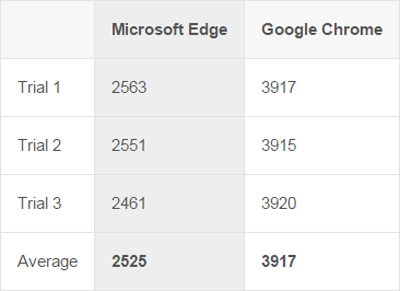
Peacekeeper is a JavaScript benchmark with some sort of test run functions ranging from rendering capabilities, HTML5, and parsing text. Below is a number or a score from Peacekeeper results comparison Microsoft vs. Google Chrome Edge.

Microsoft Edge vs. Google Chrome, Who Is The Most Excellent?

Microsoft Edge vs. Google Chrome, Who Is The Most Excellent?

The results showed a Peacekeeper score courtesy of Google Chrome is larger than the Microsoft Edge, the higher the score the more high performance from the browser and Google Chrome achieve higher numbers exceed the Microsoft Edge on the results of the test.

2. SunSpider Javascript 

SunSpider JavaScript benchmark is created by the Apple Webkit team in 2007, but a little different from the Peacekeeper because only the test of JavaScript alone. SunSpider JavaScript is often used for browser comparisons, using the latest version 1.0.2 here it results a comparison of Microsoft vs. Google Chrome Edge.

Microsoft Edge vs. Google Chrome, Who Is The Most Excellent?

Microsoft Edge vs. Google Chrome, Who Is The Most Excellent?

Seen from the figures for Microsoft Edge have numbers lower than Google Chrome, in contrast with the Peacekeeper, the lower the number in the SunSpider JavaScript means the better the performance.

3. V8 benchmark Suite - Versi 7 

Created by Google to test the performance of JavaScript in Google Chrome. Test results can already predict will be won by Google Chrome but the results also showed Microsoft Edge has a score that's not so bad.

Microsoft Edge vs. Google Chrome, Who Is The Most Excellent?

Microsoft Edge vs. Google Chrome, Who Is The Most Excellent?

The higher the score the good performance of the browser, on this test Google Chrome managed to surpass Microsoft Edge.

4. Real-World Speed 

This time the test compare between Microsoft vs. Google Chrome Edge when opening a website. The difference between the Microsoft Edge with Google Chrome only few milliseconds does not feel the real situation.

Microsoft Edge vs. Google Chrome, Who Is The Most Excellent?

Microsoft Edge vs. Google Chrome, Who Is The Most Excellent?

5. Conclusion Microsoft vs. Google Chrome Edge 

Judging from the results of the above looks Google Chrome have better performance than Microsoft Edge. Microsoft's own Edge really prove that he could replace Microsoft's Internet Explorer and Edge worth a try. There are already 10 install Windows and try the Microsoft Edge?